

Your laptop's fans,
your rules.
Draw your own CPU and GPU fan curves, switch Silent, Balanced and Turbo in one click, and watch temperatures and RPM live. A tiny app that needs no driver and no administrator rights.
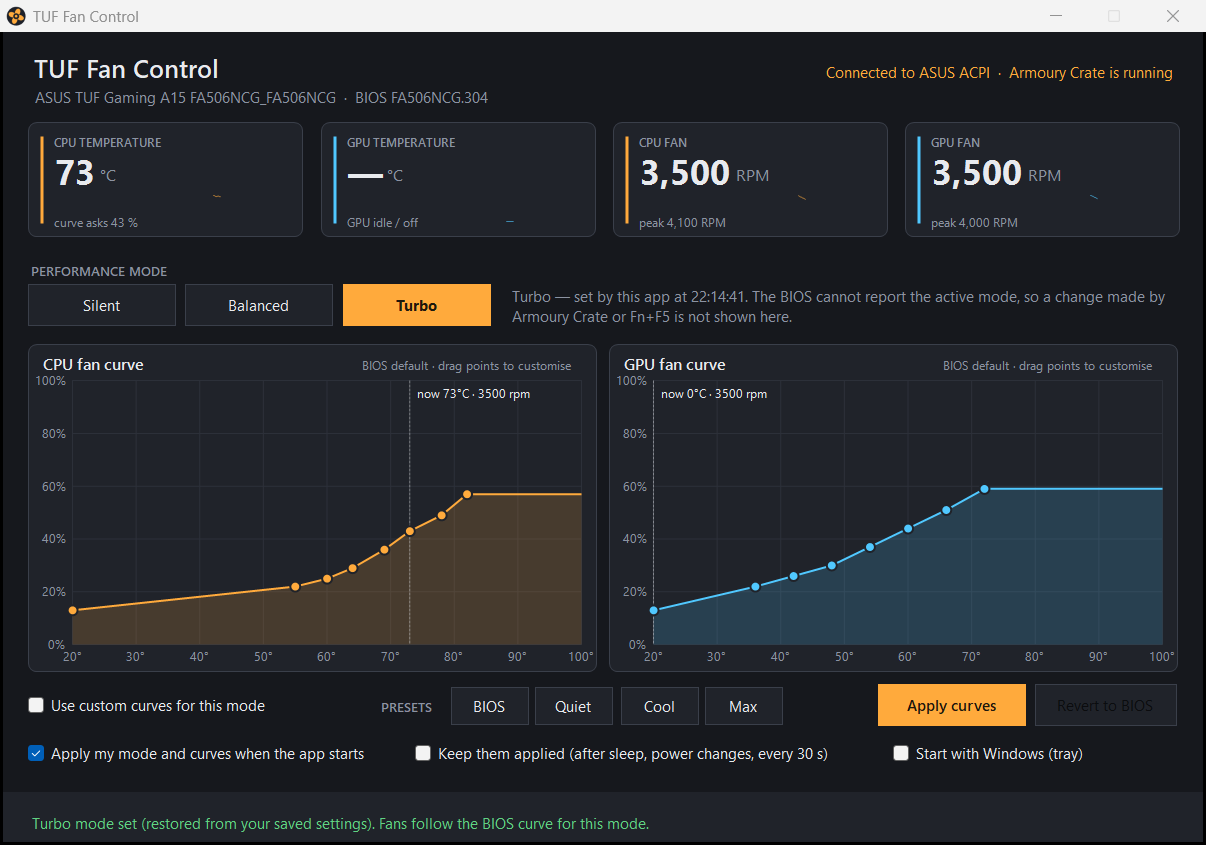
See what the fans are doing, every second.
CPU and GPU temperature, both fan speeds and the peak reached this session sit in four tiles with a small history line, so you can tell at a glance whether a curve is doing its job.
- Readings come from the BIOS, the same sensors the fans follow
- A marker on each curve shows where the fan is right now
- The tray tooltip carries the same numbers when the window is hidden
Draw the curve you want. The BIOS runs it.
Each fan has eight points: temperature on one axis, duty on the other. Drag them, or start from a preset, and press Apply. The curve is sent to the BIOS, which keeps controlling the fans itself, so its own thermal protection stays in place.
- Quiet, Cool and Max presets, plus the factory curve of each mode
- Curves are validated before they are sent; Revert restores the BIOS curve
It stays the way you set it.
The BIOS forgets custom curves at every reboot and Armoury Crate likes to re-apply its own profile after sleep or a charger change. TUF Fan Control remembers your mode and curves, restores them when it starts, and can keep re-applying them in the background.
- Re-applies after sleep, after power changes and every 30 seconds
- Minimises to the tray and can start with Windows
- Still no admin rights, no service, no driver
Everything the fans need, nothing else
One window, one tray icon, one command-line tool. No account, no cloud, no updater.
Three BIOS modes
Silent, Balanced and Turbo are the profiles the BIOS ships. Switch from the window or the tray menu, in one click.
Live readings
CPU and GPU temperature, both fan speeds and the session peak, refreshed every second with a small history line.
Draggable curves
Eight points per fan. Drag a point to decide at which temperature the fan reaches a given duty.
Presets
Start from the factory curve, Quiet, Cool or Max, fine-tune, then apply. Revert puts the BIOS curve back.
Remembers per mode
Custom curves are stored for each mode and sent again whenever you pick that mode or start the app.
Holds its ground
Optionally re-applies your mode and curves after sleep, after charger changes and every 30 seconds, so Armoury Crate cannot quietly take them back.
Tray app
Lives in the tray with the readings in its tooltip and the modes in its menu. Can start with Windows.
Command line too
fanctl.exe scripts everything: status, watch, mode, curve, set, and raw ACPI access for the curious.
Works with ASUS TUF and ROG laptops
It uses the ASUS ACPI interface that Armoury Crate and G-Helper rely on, so there is nothing to install beyond unzipping a folder.
- ASUS TUF or ROG laptop with the ASUS System Control Interface driver (installed on every one of them)
- Windows 10 or Windows 11, 64-bit. .NET Framework 4.8 is already part of Windows
- No administrator rights, no installer, no extra kernel driver
- Runs next to Armoury Crate; for a quiet life, give the fans to one of them
Built and tested on an ASUS TUF Gaming A15 (FA506NCG, BIOS 304). Download, unzip anywhere and run FanControl.exe.
fanctl status
Mode:  Turbo (last set by TUF Fan Control)
CPU:   73 C      fan 3500 RPM
GPU:   idle/off  fan 3500 RPM

fanctl mode silent
fanctl set cpu 40:10,50:20,60:30,70:45,75:55,80:70,85:85,90:100 turbo
fanctl watch 10
Everything the window does is also a command, handy for scripts, hotkeys or a scheduled task.
FAQs
Questions before you let an app near your fans
Short answers about compatibility, safety and how TUF Fan Control gets along with Armoury Crate.
Quieter desk or cooler laptop. Your call.
Download the ZIP, unzip it anywhere and run FanControl.exe. No installer, no account, nothing to uninstall.
v1.0.0 · Windows 10 and 11 · source code included in the download